
The end of
|chaos.
The start of real control.
One front door for vendors, contracts, compliance, and insights.
Revyse is the AI-powered vendor management platform for multifamily teams ready to ditch the spreadsheets, endless email back-and-forths, and missed contract renewals for good.
All your sourcing, contracts, credentials, and spend in one place. Finally.

The Platform
See how Revyse brings clarity and control to vendor and contract chaos in minutes, not months.
The Marketplace
Get access to unbiased industry feedback and uncover the top-rated software and service providers.


Discover top-rated multifamily vendors
Search by product, service, or category to find the right vendor fast. Read reviews, compare options, and make better buying decisions.

Top categories
Most Loved
Most Loved
Support Star
Support Star
Support Star
Support Star
Best Value
Most Loved
Support Star

From corporate to on-site, one platform powers it all.
Zero guesswork.
Built by former operators who were tired of wasting time on vendor management tools that didn’t fit the job. We lived the mess. Now we’re cleaning it up. 💪

Platform Features
Find the right partner, every time.
- Stop guessing. Find the top-rated vendors and suppliers who meet your standards.
- Compare categories, services, and integrations to quickly understand fit without the sales pressure.
- Backed by real reviews and trusted by multifamily teams, Revyse puts you in control of sourcing.

Let AI demystify your contracts.
- Revyse centralizes every agreement and turns it into data.
- Our AI pulls terms, pricing, renewals, and notice periods, while workflows manage templates, approvals, and countersigners, all in one seamless system.
- Bulk import existing contracts in minutes, and let Revyse automatically surface what’s missing—so nothing slips through the cracks.

From landscapers to software, everyone’s credentialed.
- Revyse collects W-9 forms, verifies Tax IDs, and checks COIs against your insurance requirements based on the actual work being done, not just the vendor’s industry.
- Easily manage requests and maintain a clear record of authorized vendors, where and why.
- You get compliance without the chaos, and your vendors get a faster, friendlier experience they won’t hate.

A clear line from contract to spend.
- Gain instant insights into your vendor spending across all properties, aligned with contracts and categorized for easy benchmarking. If you're still relying on spreadsheets, it's time to step up your game.
- Track what you're spending, flag where you're overpaying, and uncover opportunities to renegotiate. Revyse makes it easy to connect the dots between contract terms and real dollars.

Find the right partner, every time.
- Stop guessing. Find the top-rated vendors and suppliers who meet your standards.
- Compare categories, services, and integrations to quickly understand fit without the sales pressure.
- Backed by real reviews and trusted by multifamily teams, Revyse puts you in control of sourcing.
Let AI demystify your contracts.
- Revyse centralizes every agreement and turns it into data.
- Our AI pulls terms, pricing, renewals, and notice periods, while workflows manage templates, approvals, and countersigners, all in one seamless system.
- Bulk import existing contracts in minutes, and let Revyse automatically surface what’s missing—so nothing slips through the cracks.
From landscapers to software, everyone’s credentialed.
- Revyse collects W-9 forms, verifies Tax IDs, and checks COIs against your insurance requirements based on the actual work being done, not just the vendor’s industry.
- Easily manage requests and maintain a clear record of authorized vendors, where and why.
- You get compliance without the chaos, and your vendors get a faster, friendlier experience they won’t hate.
A clear line from contract to spend.
- Gain instant insights into your vendor spending across all properties, aligned with contracts and categorized for easy benchmarking. If you're still relying on spreadsheets, it's time to step up your game.
- Track what you're spending, flag where you're overpaying, and uncover opportunities to renegotiate. Revyse makes it easy to connect the dots between contract terms and real dollars.

No hype.
This is AI with a purpose.
Revyse puts AI to work, extracting contract terms, tracking renewals, and surfacing spend insights, so you can stop reacting and start predicting.
The top multifamily operators use Revyse to calm the chaos of vendor management.
Join them


Fully qualified Yardi Interface Partner
Built to fit your workflow, not fight it.
Our standard interface keeps your data flowing and teams aligned.

Enterprise-ready from day one
Designed to scale across your entire portfolio.
Comprehensive user roles and permission controls, plus secure sign-in with Microsoft SSO.

SOC 2 Type II certified end to end
Because real risk management should start with your software.
All of your data is protected by enterprise-grade security protocols. No exceptions.

Team-wide visibility across your portfolio.
Every department gets the tools they need... minus the gaps between.

Procurement & Sourcing
Give your Procurement Team the upper hand.
View global spend by vendor, turn credits and rebates into real returns, and benchmark costs across your portfolio to renegotiate from a position of strength.

Risk & Compliance
Give your Vendor Management Team peace of mind.
Automatically route vendor approvals, collect W-9s, verify TINs, and check COIs against your exact insurance requirements—tailored to the work being done, not just the category.

Legal
Give your Legal Team time back in their day.
Define contract term limits, set countersigners, and route approvals with pre-built templates your teams will actually use. Then execute agreements directly in-platform.

Operations
Give Property Ops a single source of truth.
Customize your vendor network, track supplier coverage by category, and store PMAs, COIs, and inspections in one searchable hub.

Acquisitions & Dispositions
Give your Transitions Team the easy button.
Bulk upload contracts during acquisitions and export everything at disposition. Notify active vendors of an upcoming disposition with a single click.

IT & Systems
Give your IT Team the antidote to tech sprawl.
Map your technology footprint across the portfolio. Collect and store cybersecurity docs, streamline IT risk reviews, and control user permissions at scale.

OPTECH
From the comfort of your couch
OPTECH 365, brought to you by Revyse and RETTC, takes the tradeshow experience you know and love and brings it straight to your screen. All year long. Via five category-specific, operator-led workshops. This is your all-access pass to multifamily problem-solving and innovation.
Latest Articles
5 months ago
Introducing Spend Insights: See What Your Contracts Say, and What You’re Actually Paying
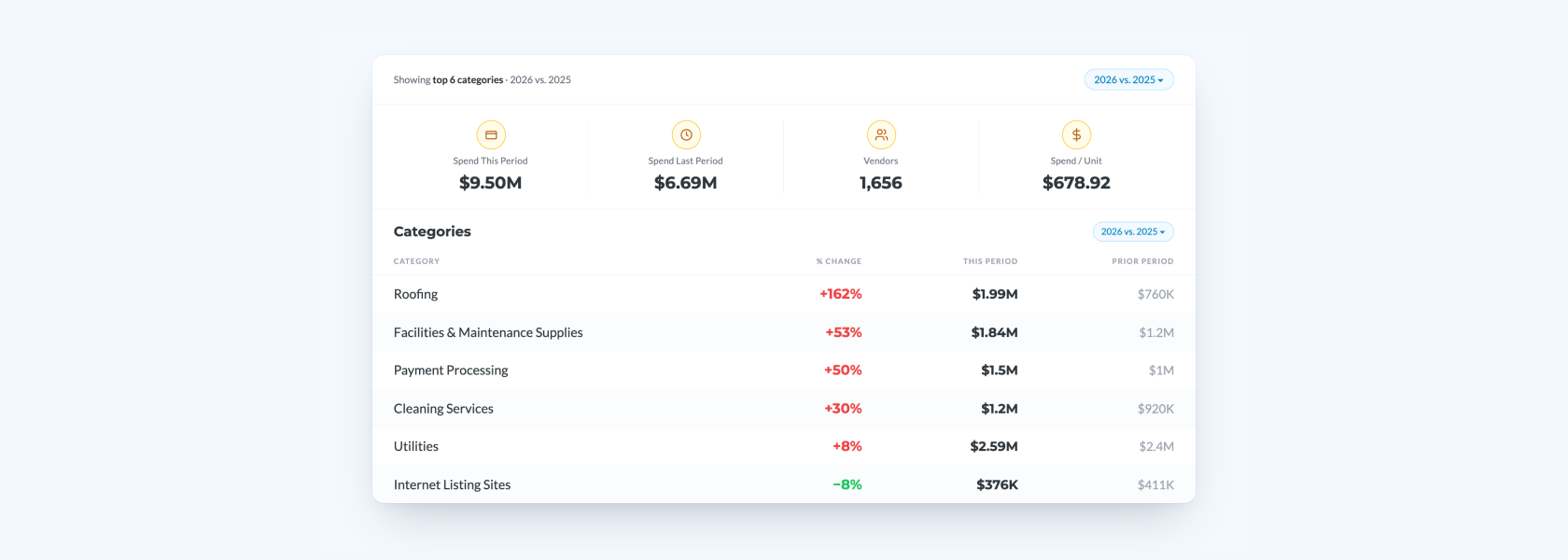
Portfolio-wide vendor spend, organized the way operators think — and tied to the contracts that govern it. Your property management system records what you paid. Your contracts say what you should be paying. Most operators have no system that compares the two. You can review invoices, pull a vendor list, or open the general ledger, where invoices land in whichever bucket has budget, not the one they actually belong to. None of that answers the questions your team is trying to ask: Where are we spending most of our money? Has landscaping climbed faster than every other category? Which properties are driving increased spend? Which vendor categories grew year over year? Where do we have leverage at renewal? That's why we built Spend Insights: a portfolio-wide view of vendor spend, organized the way operators actually think — by category, by vendor, by property — with AI Insights on every vendor profile to surface what matters at renewal. Managers now have a place to ask the cost-savings questions they couldn't answer before, and get the answers they need in an instant. Vendor spend is where margin hides Every operator is confronting the same reality: rents are flat, vendor costs are climbing, and the path to NOI expansion runs straight through operating expenses. Most platforms in this space help you buy things cheaper. That's a procurement efficiency play. It's not the same as knowing whether what you're paying matches what your contract says you should be paying — or whether your spend pattern signals a renewal opportunity, a consolidation play, or a vendor relationship that's quietly drifting. Spend Insights connects what your contracts say, what your PMS shows, and what your vendors are actually doing. No other platform in multifamily ties those three together. Where vendor spend is climbing the fastest Here are some year over year trends we're seeing in the market: Roofing is up 162% in raw spend, 76% per unit Facilities and maintenance supplies are up 53% on a rolling twelve months Payment processing is up 50% Cleaning services are up 30% in raw spend, 8% per unit Utilities are climbing in absolute dollars, but only 8% per unit This tells us portfolios are growing — average unit count is up about 17% — so part of every category increase can be attributed to a bigger footprint, not inflation. Per-unit spending cuts through that noise. That's why Spend Insights shows both. A category up 162% raw but 76% per unit is a real cost story. One up 30% raw but 8% per unit is mostly portfolio growth. These are the kinds of patterns leadership teams have been asking for and couldn't reliably get. Now they can, across their own portfolio, in real time, and with the math already done. Walking into budget season with this view changes the conversation. From portfolio view to vendor view, in one clickThe category roll-up The category roll-up shows every dollar flowing through your portfolio, categorized by what you’re paying for. Contractor Services. Property Management. Landscaping. Roofing. Cleaning. Payment Processing. Each category surfaces total spend, percent change versus the prior period, spend per unit, and spend per location. A procurement lead or finance partner can see at a glance which categories are trending up, which are flat, and which deserve a second look. The vendor drill-down Click into any category and you’ll see every vendor in it, ranked by spend, with the same period-over-period math at the line level. Where is the spend concentrated? Which contractors are growing fastest? Which vendor showed up brand new this period? Same filters, same math, same screen. Tied to the contract, surfaced at renewal Reporting alone has never been the answer. Everyone has a property management system. What operators need is the right data surfaced at the right time to take the right action at renewal. Spend Insights is anchored by the AI Insights layer. On any vendor profile, AI Insights surfaces the spend signals that matter most for the renewal in front of you. AI Insights can tell you when a vendor is getting paid without a contract across multiple properties, or flag dramatic year-over-year spend increase. Did you know your insurance line is up 30% year over year? Did you know you're paying $5 million to two payment processors? Did you know your landscaping spend has climbed 16% in 60 days? Insights that used to take weeks to find now show up tied to the contract they came from. Why this is only possible at Revyse Most platforms treat spend as a separate problem from contracts and compliance. Different tools, different data, different teams. Operators don't think about it that way, and Revyse doesn’t either. Spend Insights is the only product in multifamily that connects contract terms, AP data, and vendor compliance in one view. Revyse pairs it with Contract Management, Contract Execution, and Vendor Compliance on a single platform with deep PMS integration — so the vendor you're paying, the contract that governs that spend, and the compliance status of the relationship all live in the same place. That connection is what makes Spend Insights possible. A PMS records transactions but doesn't know what your contract says they should be. A standalone spend tool sees the invoices but not the agreements behind them. Only a platform that owns all three can tell you when spend is drifting from terms, when a vendor is being paid without an active contract, or when a renewal is about to lock in last year's mistake. So when AI Insights flags a vendor at renewal, it's drawing on the full picture: what you signed, what you've paid, and what you're risking. That's the difference between a spend report and contract intelligence. Available now Spend Insights is live today for Revyse customers with a Yardi integration. If you’re already a customer and want Spend Insights enabled, reach out to support@revyse.com. If you’re not yet a customer, we’d love to show you how Revyse can save your business money.
Read post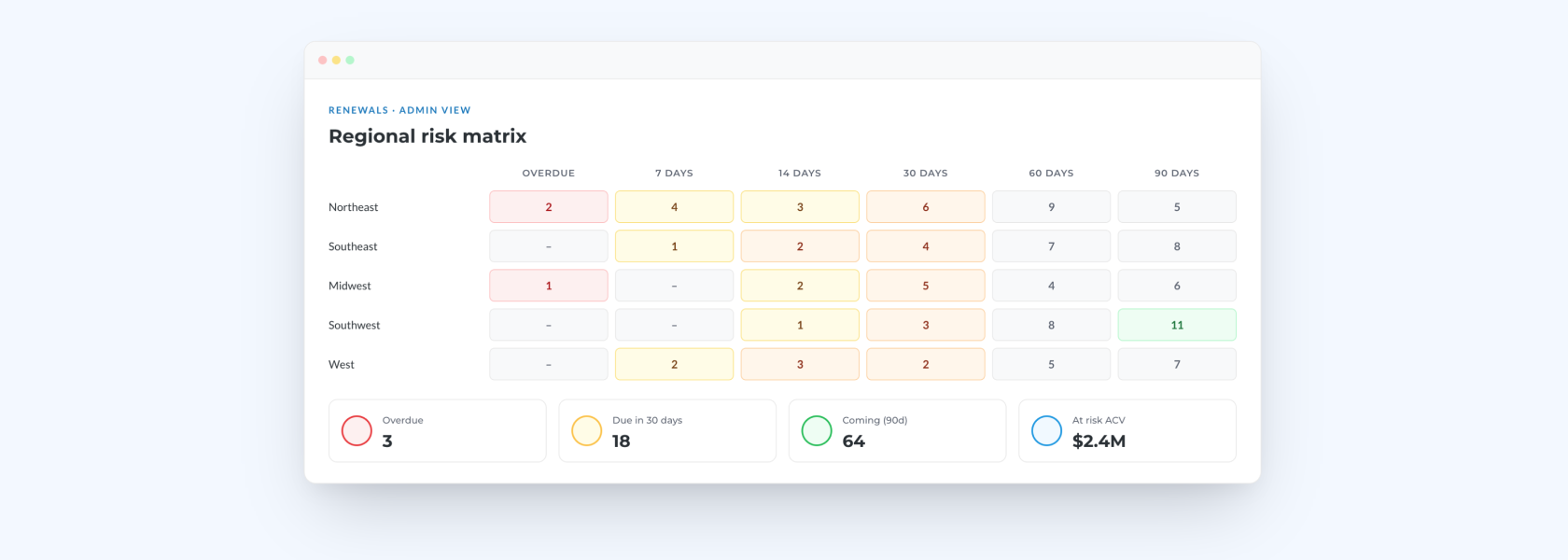
6 months ago
A New Outlook on Contract Renewals
A renewal is never just a date. It's a decision. Hold the rate or renegotiate? Is the vendor still delivering? Is this contract even worth keeping? And behind every one of those decisions sits a quieter set of questions for your team: Do we have the full picture, or just pieces of it? Where is all of this actually tracked? Does anyone have the bandwidth to review thirty contracts next month, or should we have started last week? That's the gap we built the new Renewals experience to close. Your Renewals tab now pulls every renewal signal into one place, so you can see what needs attention now, what's coming, and where risk is building. Because the teams who win renewals aren't the ones who react fastest. They're the ones who saw it coming. Two views, because renewals aren't one job Corporate teams and property teams need different things from a renewals tool. Corporate teams need a portfolio-wide read on where risk is concentrating, who's overloaded, and which months will test the team. Property teams need a short, focused list of their contracts and what requires their attention today. So we built Renewals with two views, assigned automatically by role. Admin View Admin View gives corporate leadership the full portfolio picture across six tabs: Overview: A contract-type risk matrix with overdue and upcoming windows, from 7 days out to 90. Financial Risk: A 90-day priority list sorted by ACV and days remaining, so the highest-exposure renewals can't drift. Regional Risk: Geographic concentrations of coming-due contracts, so coverage gaps surface before they slip. Team Accountability: Workload and performance status at a glance: who's ahead, who's overloaded, who's gone quiet. Vendor Consolidation: Vendors spanning multiple locations, sorted to surface master service agreement (MSA) and budget opportunities. 2026 Pipeline: Your busiest months, ranked, so you can staff ahead of the crunch rather than react to it. Manager View Manager View is the personal action center for property teams: regional managers, community managers, and anyone managing assigned contracts. It's scoped to your renewals across four tabs: Current Renewals: Daily triage with overdue first, then anything due within 30 days. Monthly Summary: The 30–90 day window, for getting ahead of work before it becomes urgent. Recent Wins: Completed renewals and cancellations over the last 30 days, for performance tracking and 1:1 prep. 2026 Pipeline: A personal renewal schedule for the full year, built for capacity conversations with your manager. Log in and your view is already filtered, already current, already yours. Nothing to configure, nothing to reconcile. From signal to action A contract 90 days out needs a different kind of attention than one 7 days overdue. Renewals is built around that reality, with time-based views at 7, 14, 30, 60, and 90 days that tell your team what to prioritize and how much runway they have. And every table, tile, and row is clickable. A contract flagged "Soon" opens the record. An overloaded team member opens their task list. A vendor spanning ten-plus locations opens the Vendors view with a consolidation conversation ready to start. This isn't a reporting layer. It's a workspace built to collapse the gap between "we should look into that" and "it's already handled." What this means for you Renewals are the highest-leverage moment in portfolio management. Handled well, they protect revenue, reinforce vendor performance, and keep your team working ahead of the calendar. Handled late, they turn into rate drift, silent auto-renewals, and vendor relationships that quietly outlive their value. Your new Renewals outlook gives every team the view they need, and makes the next click the one that moves the work forward. Available now The new Renewals experience is now available for all Revyse customers. Your view is determined by your role: corporate teams land on the Admin View; property teams land on the Manager View. [Log in to explore the new Renewals →]
Read post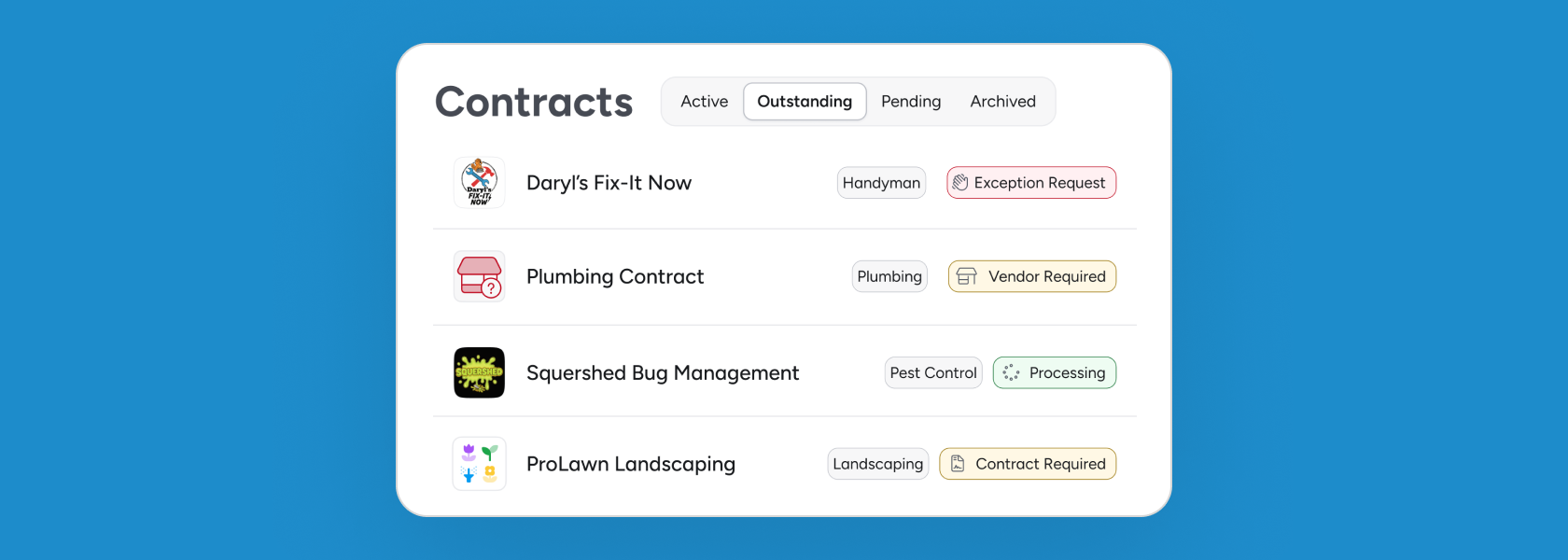
6 months ago
Revyse Now Tells You Which Contracts Are Missing Across Your Portfolio
Most contract management tools are good at showing you what contracts you have. What they can't do is tell you what contracts you're supposed to have. That's not a small distinction. Enterprise portfolios have dozens of properties and hundreds of vendor relationships, and for each required vendor category, every property needs a current vendor with an active contract. Most corporate teams will tell you they simply can't confirm that's true, not because they're not trying, but because no system has ever been built to tell them. They've sent the directive, updated the policy documents, followed up with spreadsheets and emails to property managers asking them to confirm what's on file. But whether every property actually has a current plumber under contract, right now, today? That's a gap most teams are managing with faith rather than data. By the time it surfaces, it's already a liability. The industry has spent years building better tools for managing the contracts you have. Nobody built a tool for tracking the ones you're supposed to have but don't. Until now. From gap to governance Revyse has expanded its Contract Management solution to give property management companies something they've never had: a system that connects corporate contract expectations to property-level reality, automatically. Here's how it works. Corporate teams can now define a list of Required Contracts: the vendor categories every property must have covered, with a current vendor and an active agreement. The standard lives in Revyse, and Revyse holds every property to it. Revyse then compares those requirements to active vendor contracts at each property and surfaces every gap as a Missing Contract for the relevant site team. These gaps fall into one of two categories: Vendor Required: No vendor has been assigned to a required category. Contract Required: A vendor is assigned, but no active agreement exists in Revyse. Site teams can act on each gap immediately, uploading an agreement, flagging that a contract is in progress, or submitting an exception request if the requirement doesn't apply to their property. Exception requests route to a Regional Manager or designated reviewer for approval within Revyse. Every action updates the status in real time. No email thread. No phone tag. No waiting. Regional managers get a portfolio-wide view, filterable by location to see where gaps are concentrated or by contract type to spot patterns across the portfolio. Corporate gets the live picture: not just what contracts exist, but whether the program is meeting the standard corporate set. For the first time, you don’t need an audit to maintain governance. One system for standards and accountability Required Contracts and Missing Contracts are part of Revyse's Contract Management product because that's where the underlying data already lives. Your vendor list, executed contracts, and corporate standards are already in Revyse. It's all connected. There's no new tool to implement, no separate login, no import-export cycle to maintain. The contract data you already have in Revyse starts doing more. These features are now available for Contract Management customers. Getting it configured for your portfolio takes a quick conversation with our team, so reach out to get started. If Contract Management isn't part of your Revyse setup yet, we can help get you started. The standard your portfolio has been missing is now the standard it's held to.
Read post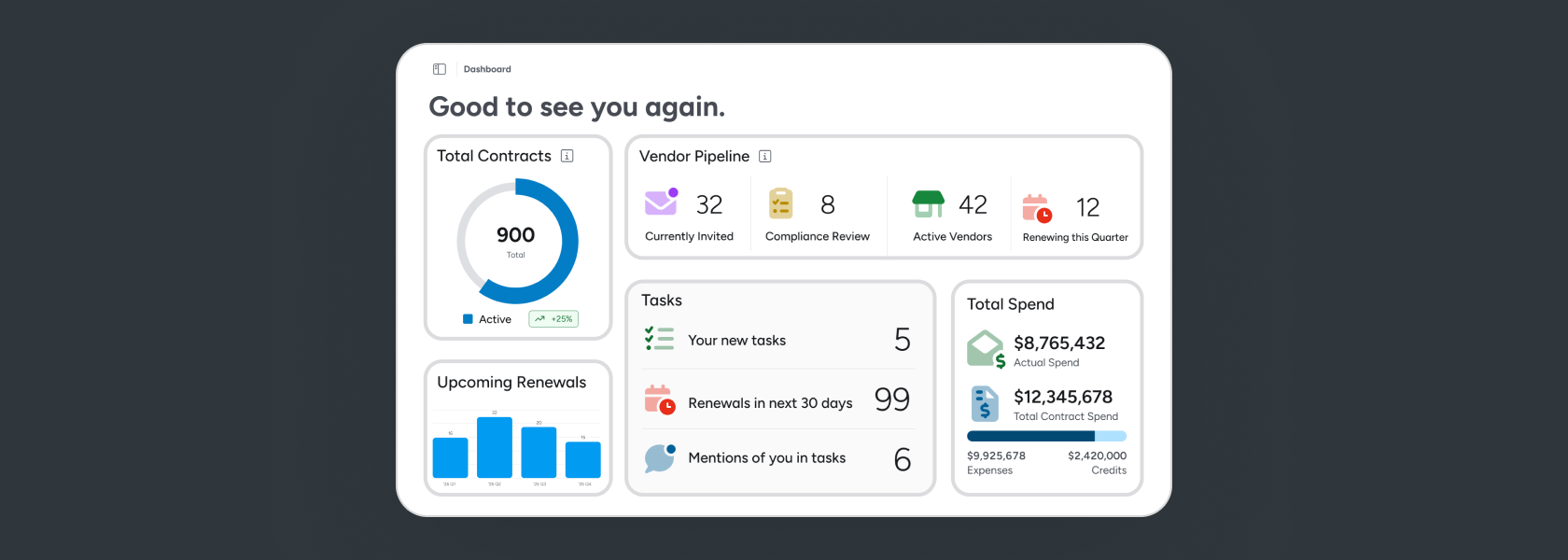
8 months ago
Vendor Management Just Got Smarter: Introducing the New Revyse Dashboard
When you're managing vendor relationships across multiple properties, you need to trust your data. But when your most important information lives across systems that don't talk to each other, it's hard to trust anything. Contract details live in your SharePoint, compliance documents in your inbox, and spend data in a spreadsheet – or maybe several spreadsheets. This fragmentation leads to missed contract renewal deadlines, overspend, and vendors stuck in compliance limbo for weeks. We built Revyse to fix this. Today, we're rolling out updates that make managing your vendor portfolio at scale faster, clearer, and more reliable. The Revyse Dashboard: Your New Command Center The new Revyse dashboard is your single source of truth for vendor management. It puts your entire vendor ecosystem – contracts, compliance, and spend – in one place, synced automatically and updated in real time. With your new dashboard, you can: Monitor document status. See the number of contracts and documents that are in the process of AI analysis, need review, or have been approved. Track all your tasks. The activities on Revyse that need your action, review, or input are all collected in one list. View your contracts at a glance. See how many contracts you have, how many are coming up for renewal, and where you're missing documentation. When your data is reliable, decisions get easier. You stop second-guessing and start moving faster. Manual reconciliation and system-hopping get replaced with a single view that does the work for you. This isn't just visibility, it's actionability. The Revyse dashboard aggregates and elevates your most important data so you can drive positive outcomes for your business. 💡 The compliance and spend widgets shown above are available to Revyse Vendor Compliance and Spend Insights users. Your dashboard will reflect the products on your plan. Know and Sort Your Vendors By Industry Managing a large vendor portfolio means understanding not just who you work with, but how your vendor base is distributed across trades and services. How many landscaping vendors are active across your portfolio? Where are HVAC contractors concentrated? Do you have duplicative vendors at a single property? Now, Revyse automatically categorizes vendors by industry, giving you an instant, portfolio-level view of how your vendor relationships break down. You can also filter all vendors by category, helping you analyze vendor distribution across the portfolio and by property. When your vendor data is structured and visible, strategic decisions become clearer. You can identify alternative vendors already working at other sites, spot concentration risks, and make informed choices about vendor relationships. You move from guessing to knowing. Documents You Can Actually Find When You Need Them Most contract libraries aren't systems; they're storage folders. You upload a file, and three weeks later when you need it, you can't remember what you named it or where you put it. So we've redesigned the document upload experience to capture key contract details at the time of upload. You'll specify who's managing the document, which vendor it's for, and what type of document it is. The alternative (the way most people manage contracts today) is to upload files quickly and search desperately later. We're flipping that equation. A few seconds of structure at upload saves hours of searching down the line. And this impact grows the more you do it. What This Means for You Revyse is building the single source of truth that property managers need to run their business. Your new dashboard is the latest improvement, helping to collect, sort, and distill vendor data in a way that actually helps you make better decisions. If you're tired of chasing down contract details, hunting through spreadsheets, or discovering renewal deadlines after they've passed, these updates are built for you.
Read post